Halloween party ideas 2015


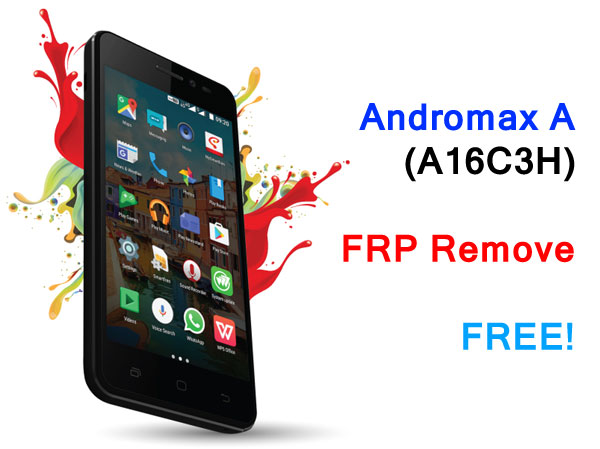
Let start! Lagi gan, hampir semua Andromax terbaru ternyata sangat mudah menghilangkan FRP hanya dengan sedikit trik mudah dan simpel dan tentunya gratis! Kalau kamu pernah membuka satu saja dari type yang serupa atau mirip maka akan mudah, ini dia caranya:
  1. Matikan Andromax A
  2. Sampai ke menu input alamat email
  3. Pada papan keyboard tekan dan tahan tanda koma ( , ) maka akan muncul tombol pengaturan bahasa, pilih saja terus akan tampil menu pilihan baru.
  4. Saatnya tekan left-softkey (menu paling kiri atau threaded window) maka akan muncul beberapa windows (threaded)
  5. Nah, paling atas ada menu search with voice. Tekan saja kemudian akan muncul menu masuk email, pilih "Lewati" dan kemudian ketik "Pengaturan" atau "Setting" maka menu pengaturan akan muncul pada list pencarian, pilih saja kemudian kamu bisa reset sekarang dari menu cadangkan dan reset.
  6. Andromax A akan mereset dan otomatis restart, tunggu sampai boot selesai dan tara...!
Mudah-mudahan ini bisa membantu kamu yang mengalami Andromax A A16C3H terkena FRP dan jangan lupa subscribe agar tidak ketinggalan informasi gratis dan menarik lainnya.

[youtube src="yJHzmx5euTo"/]


Yes, if you have Andromax E2+ and lock with FRP, don't worry it's easy to bypass. You can watch from video below and just follow the steps and your Andromax E2+ FRP will be removed. The main thing here, you have to select Google Keyboard not Android keyboard (AOSP) because when you not select Google keyboard you will not be able to proceed further.

This method is not using computer or any software just little trick and you are done, watch carefully the video, if you still unable to bypass FRP Andromax E2+, you can leave the comment with detail picture so, we may help you easier.
[youtube src="gDAiIRu8TVU"/]
Just for who still unable to bypass the FRP on Andromax E2+, you can also ask here the other way and we will provide to you for free.

[right-side]

Lagi gan, kita mau share buat yang mempunyai Andromax R (i46D1G) dan terkena FRP (Factory Reset Protection) atau Ponsel Andromax yang mempunyai versi Android lollipop ke atas boleh mencobanya juga. Caranya cukup sederhana dan gratis.

Anda cukup melihat video dibawah dengan teliti. FRP muncul ketika anda mereset ponsel tanpa menghapus akun google yang sudah ada alias ponsel akan terkunci dan meminta email lama dan tentunya anda lupa password atau pun emailnya.

[youtube src="2Emt51OrB4I"/]


Hi, guys... Today we have in hand Oppo F1 with locked FRP so, we decide to remove it without download any Google bypass APK or shortcut maker APK nor software update through recovery but we are pretty sure if you are flashing or update using QFIL it may also remove the FRP but we want the easy way for you.
  1. Turn on your Oppo F1
  2. When it ask previous email, tap on it the keyboard will appear on screen
  3. Now hold the swype button
  4. You will see several menu at Swype for Oppo window
  5. Select Gestures
  6. Select and hold any text and search symbol will appear on top
  7. Click on it (search symbol) and choose Google App
  8. On search box just type Settings (or any word in your language selection). At this section also you can type Files to access filemanager/explorer. You can put any optional APK in SDCARD if necessary.
  9.  Now you are in Settings menu
  10. Select About phone and tap the Build number to enable developer options menu
  11. In the last bottom menu, select More and choose Developer options
  12. Enable developer options and OEM unlock
  13. Now go back to More menu and then select Factory data reset
  14. Select Factory data reset and enter 0000 number to confirm reset
  15. Wait until device fully boot up again
  16. Hope this will remove Oppo F1 FRP


Hi, want to share how to bypass FRP on Samsung J106B Android 6.0 (Marshmallow) because it failed using RealTerms and the other ways is using paid software, but here we want the free way for you. This is tested methods and works so, don't worry it's also safe to do.

Follow the instructions below to reset FRP on Samsung J106B/DS Android 6.0
  1. Combination firmware that can be download from below link of post
  2. Samsung driver
  3. Flash using Odin3_v3.11.2 (in pda/ap section)
  4. After update finished, Enable USB debugging and OEM unlock at Developer options in settings (You can access setting from the top screen by slide them to bottom)
  5. Reset Samsung J106B from setting. After reset finish, enter to download mode again.
  6. After reset, you have to update again using official firmware (choose any firmware that match to your country language)

Now, when update finished, the phone won't ask the email again and you can add new google email or setup later.
    Samsung J106B Combination Firmware


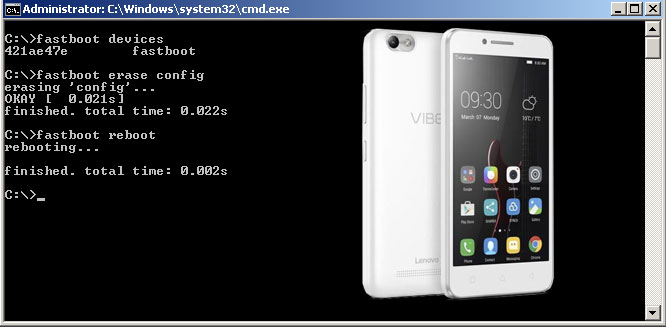
    Bypass FRP Lenovo Vibe C A2020a40. If you try to hard reset any mobile phone, it will ask previous email with min. Android 5.0 and up. Every device has different ways to bypass FRP but most have identical methods. Here we will show you how to bypass FRP on Lenovo Vibe C A2020a40

    How to Reset FRP Lenovo Vibe C A2020a40?
    1.  Turn off Lenovo Vibe C A2020a40
    2.  Enter recovery mode (by pressing power on and volume up)
    3. select "reboot to bootloader" in recovery menu
    4. After phone reboot and only showing logo, attach Lenovo Vibe C A2020a40 to computer and install fastboot driver
    5. Now open ADB program and follow command below
    [code type="Every write command finished just hit enter to execute"]fastboot device
    fastboot erase config
    fastboot reboot
    [/code]
    1. Wait Lenovo Vibe C A2020a40 boot-up and now setup your phone normally. Finished.

    ADB Program and Driver


    In some brands it has a paid tool for remove or reset FRP,e.g; Samsung. This lock happen if you try to reset Android lolipop and marshmallow. Here, i want to share how to reset Andromax E2 (B16C2H) FRP. Just follow simple steps below;

    1. You have to flash recovery so, you can reboot to fastboot/bootloader state.
    2. Download recovery image here and put in sdcard, x:\sdimage\recovery.img
    3. Turn on Andromax E2 and just wait, after finished (show up with green color)
    4. Now take of the battery and put it on again, press power + vol up to enter recovery menu
    5. Select from reboot menu, "fastboot" or "bootloader" options
    6. Attach Andromax pc and install driver, now open reset.bat and wait until your Andromax restart
    7. Finished


    Password: istored-blogspot-com


    Andromax E2 bypass FRP
    Powered by Blogger.